
With the release of StarRocks 3.5, a brand-new Cluster Snapshot recovery mechanism was introduced, further enhancing StarRocks' data protection and disaster recovery capabilities.
Cluster Snapshot offers an efficient, low-cost, and automated approach to data protection. It significantly improves system availability and fault tolerance while addressing gaps in backup and recovery under shared-data architecture. In the event of system failures, operational mistakes, or regional outages, snapshots enable recovery within minutes, minimizing data loss and reducing the risk of business disruption.
By capturing the complete cluster state and backing it up to object storage, Cluster Snapshot simplifies the traditionally complex disaster recovery process, making recovery faster and more convenient. This mechanism is particularly well-suited for mission-critical workloads in industries such as finance, retail, and SaaS, where system stability and data safety are critical.
Building on this foundation, this article draws on real-world StarRocks deployments in Kubernetes environments to explain disaster recovery mechanisms, recovery workflows, and snapshot strategies in shared-data architecture. The goal is to help users quickly restore system state during cluster failures or abnormal conditions, ensuring business continuity and data security.
Terminology
Cluster Snapshot
StarRocks 3.5 introduces support for cluster-level snapshots in the shared-data architecture, providing a complete snapshot of the entire cluster. A snapshot can be created automatically and captures the full cluster state at a specific point in time, including metadata such as catalogs, databases, tables, and users. The snapshot is stored in object storage and can be used for fast in-place or cross-region recovery.
Snapshots do not include external dependencies, such as external configuration files referenced by catalogs or locally stored UDF JAR files.
A Cluster Snapshot consists of two components: Metadata Snapshot and Data Snapshot.
Metadata Snapshot
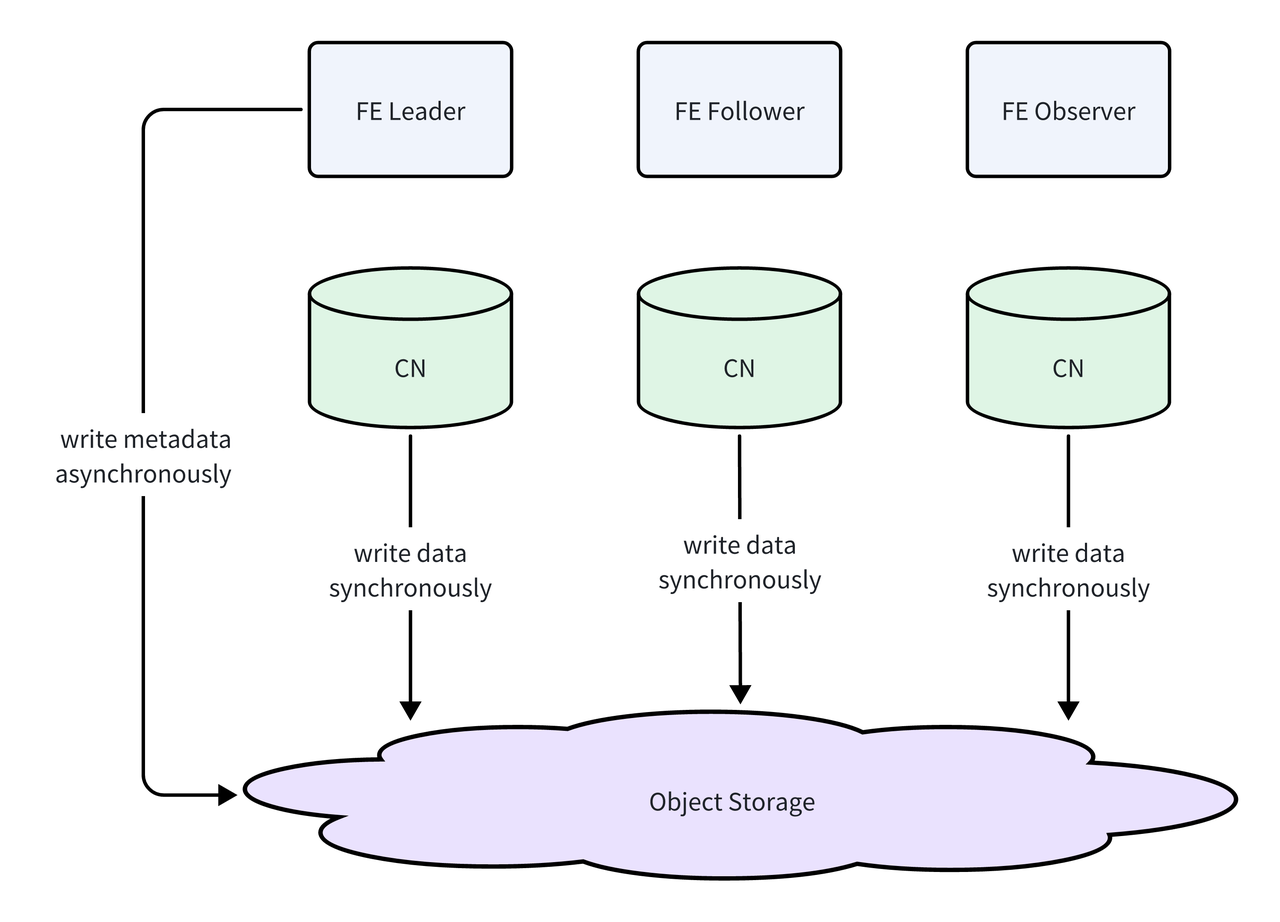
The Metadata Snapshot is generated periodically by the Frontend (FE) through its checkpoint mechanism. The resulting image file contains the cluster's metadata, including databases, tables, users, and privilege information.
Data Snapshot
In a shared-data architecture, data is stored in object storage, which offers high durability and near-infinite capacity. As a result, the snapshot process does not require copying data files. Instead, the snapshot records the specific data versions referenced by the corresponding metadata snapshot. During recovery, metadata is mapped back to these preserved data versions.
Automated Cluster Snapshots
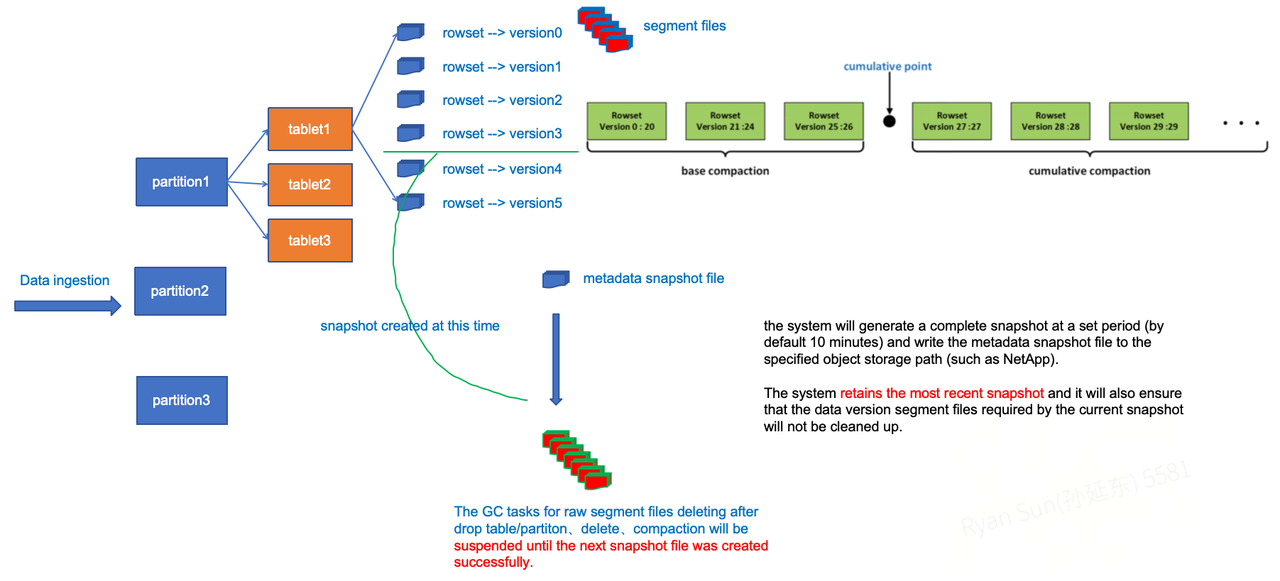
Once automated cluster snapshots are enabled, the system generates a full snapshot at a configured interval (10 minutes by default) and writes the FE metadata image file to the specified object storage path. Since the underlying data files already reside in object storage, no additional data movement occurs at the data layer. By default, the system retains only the most recent snapshot and the data versions it depends on.
As shown above, each data ingestion operation on a tablet produces a corresponding versioned rowset. For tablets that are still referenced by an active metadata snapshot, garbage collection tasks triggered by operations such as DROP TABLE, DROP PARTITION, DELETE, or Compaction are blocked until the next metadata snapshot is generated. This ensures that all data versions required by the current snapshot are preserved and not prematurely deleted.
Cluster Restore
When recovery is needed, users simply specify the snapshot's object storage path and the corresponding storage volume configuration in either the original cluster or a new cluster. The system then restores the cluster to the selected point in time by automatically loading metadata and cleaning up redundant data, ensuring both data consistency and system availability.
Design Goals
The StarRocks shared-data architecture supports automated cluster snapshots, enabling both local and remote cluster recovery through snapshots. Snapshots are stored in the same location as the data directory and preserve data from the most recent checkpoint version, allowing the cluster to be restored to the latest snapshot state.
Each time a new snapshot is generated, the system automatically creates the corresponding snapshot and deletes any previous snapshot files, retaining only the latest version. As a result, there is always exactly one automated snapshot per cluster.
Automated snapshots are triggered by the system. Users can adjust snapshot-related parameters via SQL commands to control the snapshot generation interval.
Limitation: This feature is currently supported only in shared-data architectures.
Operational Guidance
For brevity, this article omits the detailed steps for managing automated cluster snapshots and viewing snapshot and task information. Please refer to the official documentation for complete instructions: https://docs.starrocks.io/docs/administration/cluster_snapshot/
Recovery Workflow in a Kubernetes Deployment Environment
In a Kubernetes deployment environment, to allow the operator to gracefully complete reconciliation in disasterRecovery mode, the configuration options disasterRecovery and disasterRecoveryStatus are introduced.
spec:
  disasterRecovery:
    generation: 1
    enabled: true

status:
  disasterRecoveryStatus:
    phase: todo/doing/done
    reason: ""
    observedGeneration: 1
    startTimestamp: xxx
    endTimestamp: yyy
The
enabled field in the disasterRecovery configuration must be set to true.The field
disasterRecoveryStatus.phase indicates the current stage of the disaster recovery process. The possible phases are todo, doing, and done. The update logic for disasterRecoveryStatus is as follows:-
When the Operator detects that the cluster is entering disaster recovery mode for the first time (that is,
disasterRecoveryStatusis empty), or whenobservedGenerationis less thangeneration, the disaster recovery process enters thetodophase. -
After the updated StatefulSet is applied, the Operator updates
disasterRecoveryStatus.phasetodoing. The duration of this phase depends on how long the disaster recovery operation takes to complete.-
During this phase, the Operator periodically checks the status of the FE Pods. It first verifies that the Pods belong to the expected
generation, and then confirms that they are in the Ready state.
-
-
Once the FE Pods reach the Ready state,
disasterRecoveryStatus.phaseis updated todone. -
Finally, the Operator starts the cluster normally according to the
StarRocksClusterconfiguration.
How to Perform Disaster Recovery on an Existing Cluster
It is recommended to enable disaster recovery on an empty StarRocks cluster. If you must use an existing StarRocks cluster, you need to clean up both FE metadata and CN data before enabling disaster recovery.
1. Clean Up Existing Metadata
-
Manually scale the FE StatefulSet replicas down to 0.
-
Delete the corresponding FE metadata PVCs.
2. Clean Up Existing Data
-
Manually scale the CN StatefulSet replicas down to 0.
-
Delete the corresponding CN cache storage PVCs.
3. Start Disaster Recovery
After the cleanup is complete, enable disaster recovery and start the recovery process.
4. Exception Handling
4.1 CN Local Cache Cleanup
-
During in-place recovery, CN nodes may still retain old local cache data. Since the ID generator is reset during recovery, the same file name may refer to different content, leading to cache corruption.
-
Manual cache cleanup is required. This can be done by logging into the CN Pods and clearing the cache, or by forcibly deleting the PVs or PVCs so that the StatefulSet recreates fresh volumes for the CN nodes.
4.2 FE In-Place Recovery
-
In some cases, existing FE nodes may already form a high-availability (HA) cluster. After recovery, the fe-0 node restores successfully using the new metadata, while fe-1 and fe-2 may still retain old metadata and continue to form another HA cluster, potentially with its own leader.
-
This can result in a split state where fe-0 becomes the leader of the recovered cluster, while fe-1/fe-2 form a separate cluster.
-
After recovery, manually inspect and clean the metadata directories of fe-1 and fe-2 to ensure the cluster can fully converge to a consistent state.
4.3 Re-running Disaster Recovery Using generation
The
generation field can be used to trigger disaster recovery multiple times. If a previous recovery attempt does not produce the expected result, you can manually adjust the configuration and increment the generation value to re-run the recovery process.4.4 Snapshot Selection After Failure
If an FE exits abnormally during snapshot creation, two snapshots may exist in object storage. In this case, recovery should be performed using the older snapshot to ensure consistency.
➜ disaster-recovery git:(master) ✗ s3cmd ls s3://ydx-starrocks-cluster-bucket/data/5b0125af-7ff6-45df-9b60-c896797458ba/meta/image/
DIR s3://ydx-starrocks-cluster-bucket/data/5b0125af-7ff6-45df-9b60-c896797458ba/meta/image/automated_cluster_snapshot_1739446285344/
DIR s3://ydx-starrocks-cluster-bucket/data/5b0125af-7ff6-45df-9b60-c896797458ba/meta/image/automated_cluster_snapshot_1739446405766/
Disaster Recovery Practices in a Kubernetes Deployment
To make this guide easier to follow and reproduce, we use the kube-starrocks Helm chart to deploy the cluster. Please note the following prerequisites:
-
You must use Operator v1.10.0 or later, along with the corresponding YAML manifests.
-
In this document,
xxxis used as a placeholder for sensitive information. Please replace it with appropriate values for your environment.
1. Creating an Available Cluster
First, prepare the
./starrocks-values.yaml configuration file.operator:
starrocksOperator:
image:
repository: starrocks/operator
tag: v1.10.0
imagePullPolicy: IfNotPresent
replicaCount: 1
resources:
requests:
cpu: 1m
memory: 20Mi
starrocks:
starrocksCluster:
enabledBe: false
enabledCn: true
starrocksCnSpec:
config: |
sys_log_level = INFO
# ports for admin, web, heartbeat service
thrift_port = 9060
webserver_port = 8040
heartbeat_service_port = 9050
brpc_port = 8060
image:
repository: starrocks/cn-ubuntu
tag: 3.4.1
replicas: 3
resources:
limits:
cpu: 8
memory: 8Gi
requests:
cpu: 1m
memory: 10Mi
storageSpec:
name: cn
logStorageSize: 1Gi
storageSize: 10Gi
starrocksFESpec:
feEnvVars:
- name: LOG_CONSOLE
value: "1"
config: |
LOG_DIR = ${STARROCKS_HOME}/log
DATE = "$(date +%Y%m%d-%H%M%S)"
JAVA_OPTS="-Dlog4j2.formatMsgNoLookups=true -Xmx8192m -XX:+UseG1GC -Xlog:gc*:${LOG_DIR}/fe.gc.log.$DATE:time -XX:ErrorFile=${LOG_DIR}/hs_err_pid%p.log -Djava.security.policy=${STARROCKS_HOME}/conf/udf_security.policy"
http_port = 8030
rpc_port = 9020
query_port = 9030
edit_log_port = 9010
mysql_service_nio_enabled = true
sys_log_level = INFO
run_mode = shared_data
cloud_native_meta_port = 6090
enable_load_volume_from_conf = true
cloud_native_storage_type = S3
aws_s3_path = xxx
aws_s3_region = xxx
aws_s3_endpoint = xxx
aws_s3_access_key = xxx
aws_s3_secret_key = xxx
# we add this configuration because we want to get cluster snapshot quickly
automated_cluster_snapshot_interval_seconds = 60
replicas: 3
image:
repository: starrocks/fe-ubuntu
tag: 3.4.1
resources:
limits:
cpu: 2
memory: 4Gi
requests:
cpu: 1m
memory: 20Mi
storageSpec:
logStorageSize: 1Gi
name: fe-storage
storageSize: 10Gi
Note: We set
automated_cluster_snapshot_interval_seconds to trigger every minute.Next, use Helm to create the cluster.
helm install -f ./starrocks-values.yaml starrocks starrocks-community/kube-starrocks --version 1.10.0

# make sure the cluster has been successfully deployed
kubectl get pods
NAME                     READY   STATUS    RESTARTS   AGE
kube-starrocks-cn-0      1/1     Running   0          23s
kube-starrocks-fe-0      1/1     Running   0          79s
kube-starrocks-fe-1      1/1     Running   0          79s
kube-starrocks-fe-2      1/1     Running   0          79s
2. Create Tables and Insert Data
Connect to the FE
# enter FE pod
kubectl exec -it kube-starrocks-fe-0 bash

# use mysql client to login
mysql -h 127.0.0.1 -P9030 -uroot
...
mysql>
Execute the following SQL statements:
# create database and table
CREATE DATABASE IF NOT EXISTS quickstart;

USE quickstart;

-- create table
CREATE TABLE source_wiki_edit
(
    event_time      DATETIME,
    channel         VARCHAR(32)      DEFAULT '',
    user            VARCHAR(128)     DEFAULT '',
    is_anonymous    TINYINT          DEFAULT '0',
    is_minor        TINYINT          DEFAULT '0',
    is_new          TINYINT          DEFAULT '0',
    is_robot        TINYINT          DEFAULT '0',
    is_unpatrolled  TINYINT          DEFAULT '0',
    delta           INT              DEFAULT '0',
    added           INT              DEFAULT '0',
    deleted         INT              DEFAULT '0'
)
DUPLICATE KEY(
    event_time,
    channel,
    user,
    is_anonymous,
    is_minor,
    is_new,
    is_robot,
    is_unpatrolled
)
PARTITION BY RANGE(event_time)(
    PARTITION p06 VALUES LESS THAN ('2015-09-12 06:00:00'),
    PARTITION p12 VALUES LESS THAN ('2015-09-12 12:00:00'),
    PARTITION p18 VALUES LESS THAN ('2015-09-12 18:00:00'),
    PARTITION p24 VALUES LESS THAN ('2015-09-13 00:00:00')
)
DISTRIBUTED BY HASH(user);

-- insert data
INSERT INTO source_wiki_edit
VALUES
    ("2015-09-12 00:00:00","#en.wikipedia","AustinFF",0,0,0,0,0,21,5,0),
    ("2015-09-12 00:00:00","#ca.wikipedia","helloSR",0,1,0,1,0,3,23,0),
    ("2015-09-12 08:00:00","#ca.wikipedia","helloSR",0,1,0,1,0,3,23,0);

-- select data
mysql> SELECT * FROM source_wiki_edit;
+---------------------+---------------+----------+--------------+----------+--------+----------+----------------+-------+-------+---------+
| event_time          | channel       | user     | is_anonymous | is_minor | is_new | is_robot | is_unpatrolled | delta | added | deleted |
+---------------------+---------------+----------+--------------+----------+--------+----------+----------------+-------+-------+---------+
| 2015-09-12 00:00:00 | #ca.wikipedia | helloSR  |            0 |        1 |      0 |        1 |              0 |     3 |    23 |       0 |
| 2015-09-12 00:00:00 | #en.wikipedia | AustinFF |            0 |        0 |      0 |        0 |              0 |    21 |     5 |       0 |
| 2015-09-12 08:00:00 | #ca.wikipedia | helloSR  |            0 |        1 |      0 |        1 |              0 |     3 |    23 |       0 |
+---------------------+---------------+----------+--------------+----------+--------+----------+----------------+-------+-------+---------+
3 rows in set (0.34 sec)
Generate a Cluster Snapshot
Start the backup:
mysql> ADMIN SET AUTOMATED CLUSTER SNAPSHOT ON STORAGE VOLUME builtin_storage_volume;
Query OK, 0 rows affected (0.10 sec)
Wait for the backup to complete.
mysql> SELECT * FROM INFORMATION_SCHEMA.CLUSTER_SNAPSHOT_JOBS;
+------------------------------------------+--------+---------------------+---------------------+-------------+-------------+---------------+
| SNAPSHOT_NAME | JOB_ID | CREATED_TIME | FINISHED_TIME | STATE | DETAIL_INFO | ERROR_MESSAGE |
+------------------------------------------+--------+---------------------+---------------------+-------------+-------------+---------------+
| automated_cluster_snapshot_1739857978127 | 10136 | 2025-02-18 13:52:58 | 2025-02-18 13:54:17 | FINISHED | | |
| automated_cluster_snapshot_1739858117584 | 10137 | 2025-02-18 13:55:17 | NULL | SNAPSHOTING | | |
+------------------------------------------+--------+---------------------+---------------------+-------------+-------------+---------------+
2 rows in set (0.02 sec)

mysql> SELECT * FROM INFORMATION_SCHEMA.CLUSTER_SNAPSHOTS;
+------------------------------------------+---------------+---------------------+---------------+--------------------+------------+------------------------+---------------------------------------------------------------------------------------------------------------------------------+
| SNAPSHOT_NAME | SNAPSHOT_TYPE | CREATED_TIME | FE_JOURNAL_ID | STARMGR_JOURNAL_ID | PROPERTIES | STORAGE_VOLUME | STORAGE_PATH |
+------------------------------------------+---------------+---------------------+---------------+--------------------+------------+------------------------+---------------------------------------------------------------------------------------------------------------------------------+
| automated_cluster_snapshot_1739857978127 | AUTOMATED | 2025-02-18 13:52:58 | 253 | 114 | | builtin_storage_volume | s3://xxx/7351ce6a-f4a4-4937-a876-cb8801085aea/meta/image/automated_cluster_snapshot_1739857978127 |
+------------------------------------------+---------------+---------------------+---------------+--------------------+------------+------------------------+---------------------------------------------------------------------------------------------------------------------------------+
Note: Since we configured backups to run every minute, the backup path used below may differ from the one shown earlier. The final result can be verified in S3.
s3cmd ls s3://xxx/data/7351ce6a-f4a4-4937-a876-cb8801085aea/meta/image/

sDIR s3://xxx/data/7351ce6a-f4a4-4937-a876-cb8801085aea/meta/image/automated_cluster_snapshot_1739858235830/
3. Delete the Created Cluster
# Uninstall the StarRocks cluster
helm uninstall starrocks

# Remove persisted data
kubectl get pvc | awk '{if (NR>1){print $1}}' | xargs kubectl delete pvc
persistentvolumeclaim "cn-data-kube-starrocks-cn-0" deleted
persistentvolumeclaim "cn-log-kube-starrocks-cn-0" deleted
persistentvolumeclaim "fe-storage-log-kube-starrocks-fe-0" deleted
persistentvolumeclaim "fe-storage-log-kube-starrocks-fe-1" deleted
persistentvolumeclaim "fe-storage-log-kube-starrocks-fe-2" deleted
persistentvolumeclaim "fe-storage-meta-kube-starrocks-fe-0" deleted
persistentvolumeclaim "fe-storage-meta-kube-starrocks-fe-1" deleted
persistentvolumeclaim "fe-storage-meta-kube-starrocks-fe-2" deleted
4. Create a New Cluster for Disaster Recovery
We will reuse the existing
starrocks-values.yaml file, so make sure it has been saved properly. Next, prepare a new file named cluster_snapshot.yaml, which contains the configuration required for disaster recovery.starrocks:
starrocksCluster:
disasterRecovery:
enabled: true
generation: 1
starrocksFESpec:
# mount the cluster_snapshot.yaml
configMaps:
- name: cluster-snapshot
mountPath: /opt/starrocks/fe/conf/cluster_snapshot.yaml
subPath: cluster_snapshot.yaml
configMaps:
- name: cluster-snapshot
data:
cluster_snapshot.yaml: |
# information about the cluster snapshot to be downloaded and restored
cluster_snapshot:
cluster_snapshot_path: s3://xxx/data/7351ce6a-f4a4-4937-a876-cb8801085aea/meta/image/automated_cluster_snapshot_1739858235830
storage_volume_name: builtin_storage_volume
# Operator will add the other FE followers automatically
# just leave it blank
frontends: []
# Operator will add the CN nodes automatically
# just leave it blank
compute_nodes: []
# used for restoring a cloned snapshot
storage_volumes:
- name: builtin_storage_volume
type: S3
location: s3://xxx/data
comment: my s3 volume
properties:
- key: aws.s3.region
value: xxx
- key: aws.s3.endpoint
value: xxx
- key: aws.s3.access_key
value: xxx
- key: aws.s3.secret_key
value: xxx
The command used to deploy the cluster is different from the initial deployment. This time, we need to specify two YAML files, where
cluster_snapshot.yaml contains the configuration specifically for disaster recovery.helm install -f ./starrocks-values.yaml -f cluster_snapshot.yaml starrocks starrocks-community/kube-starrocks --version 1.10.0
The detailed disaster recovery process is as follows:
1. The Operator starts an FE Pod and enables disaster recovery.
# ignore the operator pod
kubectl get pods
NAME                  READY   STATUS    RESTARTS   AGE
kube-starrocks-fe-0   1/1     Running   0          4m37s
At this point, when we check the status of the StarRocksCluster, the output appears as follows:
kubectl get src kube-starrocks -o yaml | less

status:
  phase: running
  disasterRecoveryStatus:
    observedGeneration: 1
    phase: doing
    reason: disaster recovery is in progress
    startTimestamp: "1739860263"
2. After disaster recovery is complete, the Operator automatically starts the remaining Pods.
kubectl get pods
NAME                  READY   STATUS    RESTARTS   AGE
kube-starrocks-cn-0   1/1     Running   0          7m54s
kube-starrocks-fe-0   1/1     Running   0          7m1s
kube-starrocks-fe-1   1/1     Running   0          7m54s
kube-starrocks-fe-2   1/1     Running   0          7m54s
The cluster status appears as follows:
kubectl get src kube-starrocks -o yaml | less

status:
  phase: running
  disasterRecoveryStatus:
    observedGeneration: 1
    phase: done
    reason: disaster recovery is done
    startTimestamp: "1739860263"
    endTimestamp: "1739861262"
Verify Disaster Recovery Success
Check whether data recovery has been completed.
# enter the pod
kubectl exec -it kube-starrocks-fe-0 bash

# connect mysql
mysql -h 127.0.0.1 -P9030 -uroot
Welcome to the MySQL monitor.  Commands end with ; or \g.
Your MySQL connection id is 0
Server version: 8.0.33 branch-3.4-12d148f

Copyright (c) 2000, 2025, Oracle and/or its affiliates.

Oracle is a registered trademark of Oracle Corporation and/or its
affiliates. Other names may be trademarks of their respective
owners.

Type 'help;' or '\h' for help. Type '\c' to clear the current input statement.

# get the data
mysql> USE quickstart;
Reading table information for completion of table and column names
You can turn off this feature to get a quicker startup with -A

Database changed
mysql> SELECT * FROM source_wiki_edit;
+---------------------+---------------+----------+--------------+----------+--------+----------+----------------+-------+-------+---------+
| event_time          | channel       | user     | is_anonymous | is_minor | is_new | is_robot | is_unpatrolled | delta | added | deleted |
+---------------------+---------------+----------+--------------+----------+--------+----------+----------------+-------+-------+---------+
| 2015-09-12 08:00:00 | #ca.wikipedia | helloSR  |            0 |        1 |      0 |        1 |              0 |     3 |    23 |       0 |
| 2015-09-12 00:00:00 | #ca.wikipedia | helloSR  |            0 |        1 |      0 |        1 |              0 |     3 |    23 |       0 |
| 2015-09-12 00:00:00 | #en.wikipedia | AustinFF |            0 |        0 |      0 |        0 |              0 |    21 |     5 |       0 |
+---------------------+---------------+----------+--------------+----------+--------+----------+----------------+-------+-------+---------+
3 rows in set (2.00 sec)
Want to dive deeper into the technical details or join the discussion? Join StarRocks’ Slack channel to learn more.